CDM 2015 SOFTWARE · FOR PRINCIPAL CONTRACTORS

CDM management software, site by site.

Assuraz CDM Sites runs every construction site the way the Construction (Design and Management) Regulations 2015 expect: the construction phase plan, inductions, contractor RAMS, sign-in, checks and the health and safety file, in one place.

  • AI construction phase plans
  • Induction slides and videos
  • AI RAMS checks and creation
  • QR sign-in and live fire roll
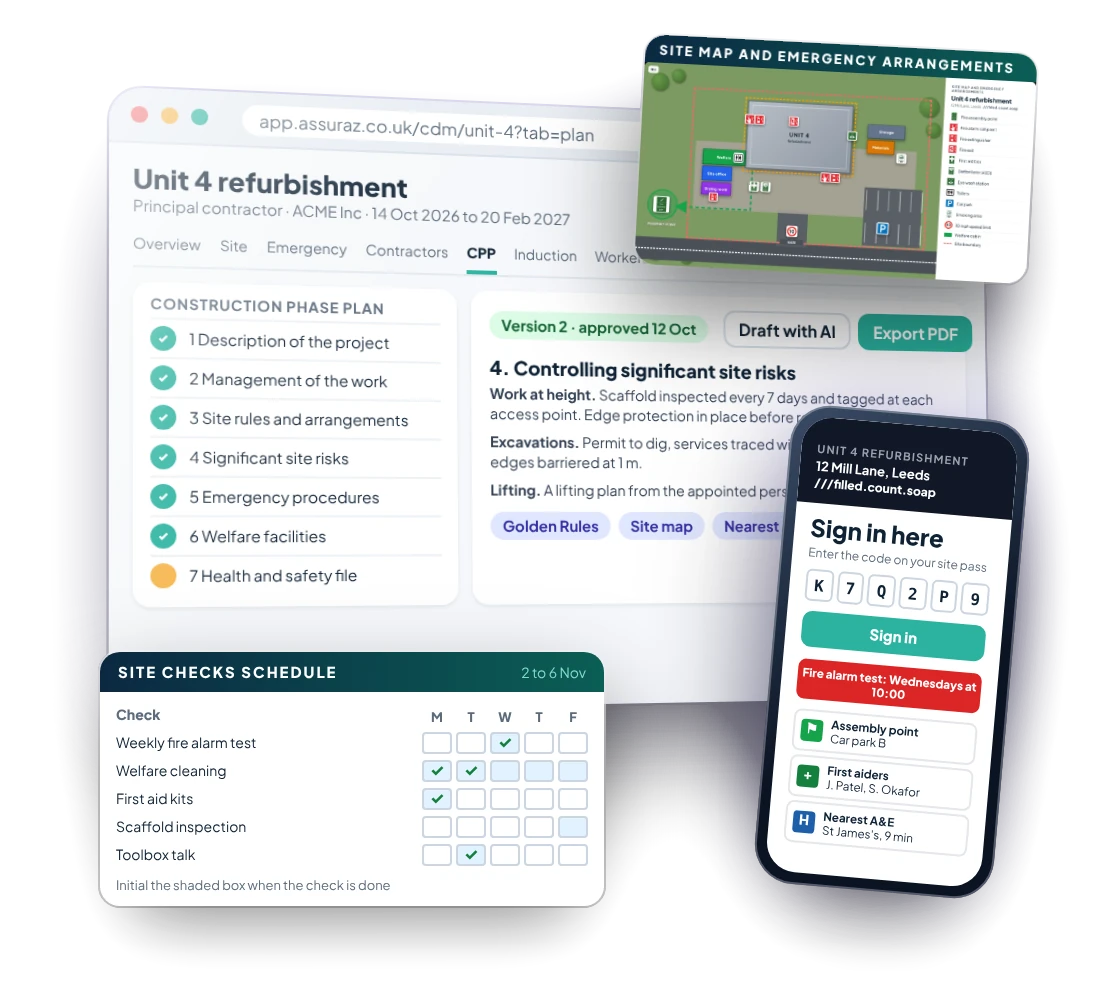
Assuraz CDM Sites: the construction phase plan, the gate sign-in page on a phone and the site checks schedule, with sample data

35

construction workers killed at work in Great Britain in 2024/25

50,000

construction workers injured each year

2.2 million

working days lost a year in construction

£188 an hour

HSE's Fee for Intervention when it finds a material breach

Sources: HSE, Construction statistics in Great Britain 2025; HSE fees and charges.

WHAT IT DOES

Everything a principal contractor does under CDM

REGULATION 12

Construction phase plan software

AI drafts all twelve sections of the construction phase plan from what you already know about the site: the team, emergency arrangements, welfare, hazards and high-risk work.

  • Check, edit and approve it as a numbered version
  • Export to PDF or Word in your brand colours
  • Upload a plan the client has already approved
  • The plan feeds the induction, the site rules at sign-in and the H&S File

REGULATION 13

Site induction presentations and videos

A branded site induction is built from the plan: who is who, site rules, golden rules, the site map, emergencies, the nearest A&E with directions, welfare and PPE.

  • Present on screen or download as PowerPoint
  • Turn it into a narrated induction video with a presenter
  • Download it to use with no internet
  • Show the client's own induction video alongside

REGULATION 15

RAMS review and RAMS creation with AI

Upload a contractor's risk assessment and method statement and AI checks it against your checklist: a clear rating, critical items missing, omissions and best practice.

  • A competent person makes the final decision
  • The contractor shows as approved on the site
  • Create your own RAMS from the site: tasks, plant, COSHH, hazards and method
  • Workers read and sign on from their phones

SCHEDULE 2 AND PART 4

QR site sign-in and a live fire roll

A QR poster at the gate signs workers and visitors in and out on their phones, with the site address, what3words, grid reference, first aiders and the weekly fire alarm test.

  • Site passes with a personal code
  • A live list of who is on site for the assembly point
  • Today’s site rules shown at sign-in
  • Incidents reported from any phone

PART 4

Site checks, permits and temporary works

The day-to-day records of a construction site, kept on the day they happen.

  • A daily checks schedule with a printable wall poster
  • Permits to work: issued, live, extended and closed
  • A temporary works register following BS 5975
  • Daily briefings and toolbox talks taken on phones

REGULATION 12(5)

The health and safety file, built as you go

Set out the way HSE's L153 guidance describes, with AI drafting the empty sections when the plan is made. Drawings and certificates drop into the right section as they arrive.

  • Ready to hand over at the end of the job
  • Exported as one document
  • Nothing chased in the last week
  • Kept with the site for the client

BUSINESS CONTINUITY

Keep recording when the site loses its signal

Every site has an Excel workbook with locked headings and drop-downs of your workers, contractors and toolbox talks. Record sign-ins, inductions, briefings, toolbox talks, site checks and incidents, then import it when you are back online. A preview shows what will be added before anything changes.

  • A locked tab for each record
  • Your workers and contacts in the name drop-downs
  • Checked and previewed before import
  • Everything lands in the right place on the site

CDM 2015 duties, covered

Each part of a CDM Site answers a duty of the principal contractor under the regulations.

DutyWhere in CDM 2015In Assuraz
Notification (F10)Regulation 6Site tab, with the F10 and the noticeboard
Pre-construction informationRegulation 4Items requested and received, with files
Construction phase planRegulation 12Drafted by AI, approved and versioned
Site inductionRegulation 13Slides, video and an offline copy
Contractors and their RAMSRegulation 15Appointments, AI RAMS checks, competence
Welfare and site checksSchedule 2Daily and weekly checks with a wall poster
Emergency arrangementsPart 4Alarm, assembly point, first aid, hospitals
Temporary worksRegulation 19Register and item records
Consultation and engagementRegulation 14Briefings and toolbox talks
Health and safety fileRegulation 12(5)L153 sections, built as you go

About 164 hours back on a typical site

Our estimate for a 20-week site with 60 workers and 8 contractors: about 210 hours of CDM paperwork by hand, about 46 with Assuraz. That is roughly four working weeks per site.

Construction phase plan

16 hours 2 hours

Induction presentation

8 hours 30 minutes

Induction video

2 days 30 minutes

Checking 12 contractor RAMS

24 hours 6 hours

Writing 4 of your own RAMS

24 hours 6 hours

Sign-in, passes and fire roll

25 hours 2 hours

Health and safety file

24 hours 6 hours

Estimates by Assuraz. Your figures depend on the size of the site and how you work today.

Included with every CDM Site

3users
2construction phase plans by AI
2induction videos
25contractor RAMS checked by AI
25RAMS written by AI
1sign-in kiosk
200workers
2,000toolbox talks
2H&S File drafts by AI

CDM Sites is an optional add-on to any Assuraz plan. Start a new site from an existing one and its arrangements carry over.

Questions about CDM software

What is CDM management software?

Software that helps the duty holders under the Construction (Design and Management) Regulations 2015 plan, manage and monitor construction work. Assuraz CDM Sites is built for the principal contractor: the construction phase plan, inductions, contractors and their RAMS, site sign-in, checks, permits, temporary works and the health and safety file, site by site.

Can Assuraz write a construction phase plan?

Yes. AI drafts all twelve sections from the information you enter for the site. You stay responsible for it: you check it, edit it and approve it before the construction phase starts, as regulation 12 requires. You can also upload a plan the client has already approved.

How does the AI RAMS check work?

Upload the contractor's RAMS as a PDF, Word file or image. It is checked against your own checklist and given a rating, with any critical items missing, omissions and best-practice suggestions. A competent person in your team makes the decision to approve or reject it.

Can workers sign in without an app?

Yes. Workers scan the QR poster at the gate with their phone camera and sign in on a web page with the code on their site pass. A tablet can also be used as a sign-in kiosk.

What happens if the site loses its internet connection?

Each site has a business continuity workbook in Excel, with locked headings and drop-downs of your workers, contractors and toolbox talks. Record sign-ins, inductions, briefings, toolbox talks, checks and incidents in it, then import it when you are back online.

Where is the data held?

In Microsoft Azure's UK South region, encrypted in transit and at rest, with multi-factor sign-in for every user.

START YOUR FREE TRIAL

Your next site, sorted.

30 days free with every add-on switched on, CDM Sites included. No card needed.

info@assuraz.co.uk · Screens show sample data for ACME Inc

Assuraz